
Developer Toys - Tools For Dev2.3.1 - Google Play
You'll be able to see results in few seconds.
Publisher Description



Helping developers for getting device details and managing application.
This app is meant for helping developers while developing complex device specific applications and also for users who want a simple tool to manage their device applications [backup and uninstall applications]
This application will make the development tasks bit easier.
Applications features -
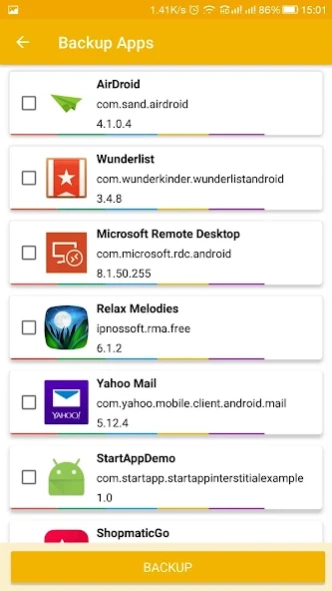
• Backup Application APKs [can take backup of installed applications]
• Uninstall Applications [can uninstall one or multiple apps]
• Create Desktop Shortcut of Applications [long press to select app and select create shortcut]
• Device Sensors [displays list of all the sensors present in device]
• Sensor Information [displays all the details of selected sensor]
• Battery Status [current status of battery with all other details ex. temperature and voltage]
• Screen Information [all the details regarding device screen, screen size, resolution, refresh rate etc.]
• IP Address [IP address of device based on connection]
• IMEI numbers
• Device Build Information [make, model, hardware serial no, brand name, android version and SDK version]
• Telephony Details [phone type, no of SIMs, network type, SIM operator details, IMEI no, subscriber id etc.]
• Wi-Fi & Bluetooth Details [Wi-Fi & Bluetooth Mac address, SSID, link speed, frequency of link]
• Storage & RAM Info [Internal and External Storage info at a glance]
• CPU Information [CPU core and utilization info]
• Hardware Information [Information regarding processor, hardware manufacturer, CPU cores, its frequencies, etc]
• Camera Information [configurations and info regarding front and back camera]
• Multi-touch detector [check how many finger touch your screen supports ]
• Reboot Options [Only for rooted devices]
• Widget as shortcut for opening Developer Options menu from home screen.
About Developer Toys - Tools For Dev
The company that develops Developer Toys - Tools For Dev is TechnoStar. The latest version released by its developer is 2.3.1.
To install Developer Toys - Tools For Dev on your Android device, just click the green Continue To App button above to start the installation process. The app is listed on our website since 2024-02-03 and was downloaded 0 times. We have already checked if the download link is safe, however for your own protection we recommend that you scan the downloaded app with your antivirus. Your antivirus may detect the Developer Toys - Tools For Dev as malware as malware if the download link to com.pranay.devtoys is broken.
How to install Developer Toys - Tools For Dev on your Android device:
- Click on the Continue To App button on our website. This will redirect you to Google Play.
- Once the Developer Toys - Tools For Dev is shown in the Google Play listing of your Android device, you can start its download and installation. Tap on the Install button located below the search bar and to the right of the app icon.
- A pop-up window with the permissions required by Developer Toys - Tools For Dev will be shown. Click on Accept to continue the process.
- Developer Toys - Tools For Dev will be downloaded onto your device, displaying a progress. Once the download completes, the installation will start and you'll get a notification after the installation is finished.
Program Details
System requirements
Download information
Pricing
Version History
version 2.3.1
posted on 2024-02-03
Support for Android 13 Tiramisu.
Android SDK version updated.
Bug Fixes and Enhancements.
version 2.2.1
posted on 2021-03-23
Disclaimer
Official Google Play Link
We do not host Developer Toys - Tools For Dev on our servers. We did not scan it for viruses, adware, spyware or other type of malware. This app is hosted by Google and passed their terms and conditions to be listed there. We recommend caution when installing it.
The Google Play link for Developer Toys - Tools For Dev is provided to you by apps112.com without any warranties, representations or guarantees of any kind, so access it at your own risk.
If you have questions regarding this particular app contact the publisher directly. For questions about the functionalities of apps112.com contact us.
